© 2025 Messer Cutting Systems, Inc.

Choosing a Cable Direct Attach manufacturer is not just a price comparison. Buyers need assemblies that match their equipment, rack layout, and data-rate requirements. A cable that fits the port may still fail to meet a system’s length, signaling, or qualification needs.
This guide introduces ten manufacturers for buyers evaluating Direct Attach Cables, commonly called DACs. It considers practical factors such as supported standards, passive or active designs, available lengths, connector options, product documentation, and quality controls. These details matter when a short copper link connects switches, servers, or storage systems inside a rack. Small differences can affect installation and troubleshooting.
Check the specifications carefully. Look for clear compatibility information and test documentation, then confirm requirements with the supplier before ordering. Ask about labeling, warranty terms, and sample availability, especially when purchasing for a larger deployment. A datasheet is useful, but it cannot answer every site-specific question.
No single supplier is the right choice for every buyer. Product ranges, availability, and support can change, and published claims deserve verification. That takes time. The manufacturers in this overview offer a starting point for comparison, not a guaranteed ranking or endorsement. Use the list to narrow your options, then validate the exact cable against your equipment and operating environment. A little extra checking may feel tedious. It can prevent a surprisingly costly mismatch.
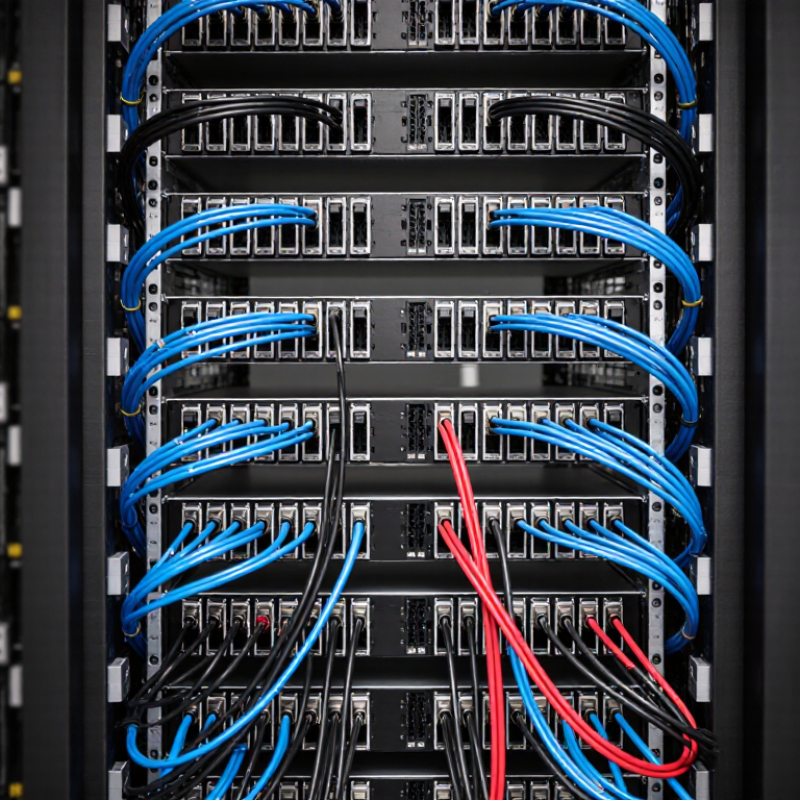
A direct attach cable, or DAC, combines copper wiring with connector assemblies designed to plug directly into compatible network ports. Unlike fiber links, it typically needs no separate optical transceivers. Passive DACs carry signals without active electronics in the cable; active versions include signal-conditioning components. Both are commonly used for short connections inside server racks. Short runs matter.
Buyers use DACs to connect switches with servers, storage systems, and other network equipment. A cable might bridge two adjacent rack units or link a server to a top-of-rack switch. This can reduce installation steps and keep connections tidy. Yet a low purchase price does not guarantee a suitable link. Port type, supported data rate, cable length, and equipment compatibility all need checking.
In a busy data center, a cable that is too short can pull against ports, while excess length can obstruct airflow or complicate service. Check the details. Buyers should also confirm whether passive or active construction is recommended for the intended distance. Compatibility lists and specifications from equipment suppliers are useful, but they may not answer every installation question. That sounds simple. It isn’t always: firmware, port configuration, or tight bends can affect results, so test the planned cable in the actual setup when practical.
When evaluating direct attach cable manufacturers, begin with the exact link requirements: data rate, reach, connector type, and host compatibility. Ask for clear specifications covering cable length, wire gauge, power consumption, and passive or active design. Fit matters. A connector that looks correct may still fail to latch securely or match the equipment’s configuration.
Review how the manufacturer controls production quality. Request sample test reports for signal integrity, continuity, and interoperability, and check whether the tested cable matches the item being quoted. Ask for evidence. Useful records should identify test conditions and acceptance limits, not just state that a product passed. Also discuss traceability, batch consistency, and how design changes are communicated.
Support is part of the evaluation, too. Ask how technical questions are handled and whether engineers can help diagnose link errors or unexpected heat. Compare sample performance with the published specifications before placing a larger order. A careful sample review can still miss issues that appear only in a dense rack or during extended use. That is worth remembering. No checklist removes every risk, so keep the evaluation tied to your actual equipment and operating conditions.
| # | Evaluation Dimension | What to Evaluate | Evidence to Request | Buyer Check |
|---|---|---|---|---|
| 1 | Standards and interoperability | Whether the cable assembly is designed for the stated interface, data rate, and host equipment. DAC assemblies are commonly offered for interfaces such as SFP- and QSFP-style ports. | Interface specification, supported data rates, compatibility list, and test results for the intended host platform. | Confirm the exact port type and speed at both ends; do not rely on connector appearance alone. |
| 2 | Passive or active design | Passive DACs carry signals through copper without signal-conditioning electronics in the cable assembly. Active copper DACs include electronics to support signal conditioning or reach requirements. | Product datasheet identifying the cable as passive or active, power requirements if applicable, and supported reach. | Match the design to the link distance, power budget, and equipment requirements. |
| 3 | Supported reach and cable length | The maximum supported length depends on the interface, data rate, cable construction, and whether the assembly is passive or active. | Length-specific datasheets and validation results for the exact assembly configuration. | Select the shortest practical cable that meets the installation layout; verify the rated reach at the required speed. |
| 4 | Electrical performance | Signal integrity is affected by insertion loss, return loss, crosstalk, and other electrical characteristics across the supported operating range. | Applicable test reports or compliance documentation for the specified interface and cable length. | Compare like-for-like test data and ask how production units are checked against the design limits. |
| 5 | Connector and latch quality | Connector fit, retention, release mechanism, and housing durability affect installation and repeated handling. | Connector drawings, material details, retention or durability test information, and sample assemblies. | Inspect mating fit and latch operation in the actual equipment, including access in dense rack layouts. |
| 6 | Cable construction and flexibility | Conductor and shielding design, outer-jacket material, cable diameter, and bend requirements influence routing and mechanical fit. | Cable construction details, outer diameter, minimum bend guidance, and material information. | Check that the cable can be routed without exceeding its stated bend limits or obstructing adjacent ports. |
| 7 | Manufacturing quality controls | A repeatable process should include documented inspections and electrical or functional checks appropriate to the product. | Quality-system documentation, inspection plans, sample test records, and traceability information. | Ask which tests are performed on every unit and which are performed by sampling. |
| 8 | Compatibility validation | Host platforms may have specific compatibility requirements, including identification or coding behavior for the cable assembly. | A documented host compatibility list and a process for testing requested configurations. | Test a sample in the target switches, servers, or storage equipment before a large purchase. |
| 9 | Traceability and support | Clear part identification, revision control, warranty terms, and responsive technical support help manage deployment and troubleshooting. | Sample labels, lot or serial traceability details, written warranty terms, and support response procedures. | Confirm how product revisions and substitutions are communicated after qualification. |
| 10 | Supply, customization, and total cost | Availability, lead time, minimum order requirements, length options, labeling, and lifecycle support can affect the total cost of ownership. | Written quotation, production lead-time estimate, customization options, and change-notification policy. | Compare equivalent specifications and include qualification, spares, delivery, and support costs. |
Note: This table is a buyer evaluation framework, not a ranked list of named manufacturers. Confirm specifications and compatibility for each exact cable assembly before purchase.
Choosing among the top 10 direct attach cable manufacturers starts with the intended link, not the catalog. Match each cable to the port generation, data rate, reach, and equipment compatibility. Passive DACs suit short connections with limited power needs; active versions can support longer runs but may add heat and cost. Small details matter.
Ask manufacturers for compatibility records, test procedures, and clear labeling. A reliable supplier should explain connector type, cable length, wire gauge, and operating temperature without hiding behind vague claims. Check whether each unit receives electrical testing, and whether production batches are traceable. Request a sample when possible. Inspect its connectors, bend flexibility, and label against the quotation before approving a larger order.
Price deserves scrutiny, but the lowest quote may omit useful documentation or support. Compare lead times, warranty terms, customization options, and response quality alongside unit cost. A specification sheet can appear complete and still miss a switch-specific limitation; verify the exact setup with the supplier. Buyers should also consider how cables will sit in a crowded rack, where tight bends can complicate installation. Even a careful shortlist has gaps, so record what remains unverified before selection.
When comparing the top cable direct attach cable manufacturers, look beyond catalog size. Check whether each offers passive and active options, the connector types you need, and the data rates and lengths available. A cable intended for a short rack connection may not suit a longer run. Confirm compatibility with the host and switch, rather than relying on a broad “compatible” label. Small details matter.
Tips: Ask for a specification sheet and sample before placing a large order. Verify cable length, bend radius, jacket material, and operating temperature. For a sample, check that the connectors seat firmly and the cable routes cleanly through your rack. Request clear test criteria, too.
Manufacturing capability matters as much as product range. Ask how the supplier controls assembly quality, handles custom lengths, and tracks production batches. Support should include practical answers on compatibility, lead times, and troubleshooting—not just a sales contact. Compare response quality with the same technical questions. It can reveal gaps. Still, a polished response does not prove consistent production; independent testing or a small pilot order offers stronger evidence. Some buyers overvalue a low unit price and overlook replacement delays. That trade-off is easy to miss.
Top 10 Cable Direct Attach Cable Manufacturers for Buyers
How to Select a Manufacturer for Your Requirements
Start with the link, not the catalogue. Record the switch and server ports, data rate, cable length, rack path, and airflow limits. A direct attach cable that works in a short lab link may fail across a crowded rack. Check the vendor’s stated reach and confirm it against your actual route, including bends and cable slack.
Use standards as a practical filter. The IEEE 802.3ck specification defines electrical interfaces supporting 100 Gb/s per lane, while the Ethernet Alliance’s 2024 Ethernet Roadmap covers 400GbE, 800GbE, and 1.6TbE technologies. These figures help frame future bandwidth needs; they do not prove a cable is compatible with your equipment. Ask for test results at your required rate and length, including insertion loss and bit-error performance. Request the exact part number and written confirmation for both endpoint devices.
Then inspect manufacturing evidence. Ask how each cable is tested, how serial numbers link to production records, and whether samples can be evaluated in your rack. Compare warranty terms, lead times, and replacement procedures—not just unit price. Get details in writing. A polished datasheet is useful, but it cannot reveal every interoperability issue. I would also keep one small doubt: a sample that passes today may not represent every production batch. Ask about batch controls, and verify a later shipment before a large rollout.
Use the link rate supported by your switches and servers as a starting point when comparing direct attach cables. These are standardized Ethernet speed classes, not manufacturer performance ratings. Confirm port compatibility, cable length, and supported specifications with the supplier before purchasing.
© 2025 Messer Cutting Systems, Inc.