© 2025 Messer Cutting Systems, Inc.

Choosing the right Power Tool Accessories can improve accuracy, safety, and the working life of your tools. A drill bit, cutting disc, or sanding pad may look simple, but each accessory has a specific material, speed range, and workload. Using the wrong one can cause rough cuts, overheating, or premature wear. Small choices matter.
This guide, “10 Tips for Choosing Power Tool Accessories,” focuses on practical decisions that professionals and experienced DIY users regularly face. It considers compatibility, material quality, application, size, speed ratings, and manufacturer guidance. A reliable accessory should fit securely, perform consistently, and match the tool’s operating requirements. Check the label carefully.
Real projects often reveal details that product photos hide. A masonry bit may survive a short repair but struggle during continuous drilling. A sanding disc can remove paint quickly, yet leave visible marks on soft wood. I have also found that cheaper accessories sometimes seem economical until replacement time arrives. That is not always true, but it deserves reflection. Checking specifications before purchase helps reduce mistakes and protects both the user and the equipment. Safety glasses, stable workpieces, and controlled pressure remain essential, even with high-quality products. These tips are designed to support informed choices rather than promise perfect results. Conditions vary, and careful testing is still necessary.
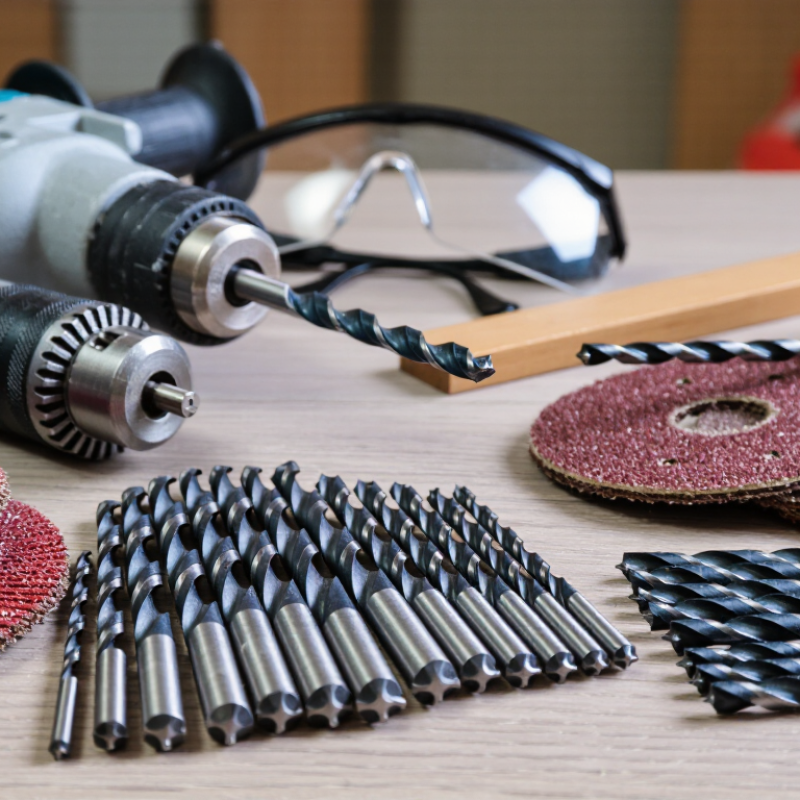
Identify the power tool before selecting any accessory. A cordless drill usually handles drilling and light fastening tasks. An impact driver needs impact-rated bits that tolerate sudden torque. A rotary tool requires smaller accessories for detailed cutting, sanding, or polishing.
Consider the material and the intended application together. Wood, masonry, metal, and plastic each demand different cutting edges or abrasive surfaces.
I once chose a general-purpose bit for dense hardwood, expecting a clean hole. It overheated quickly and left a ragged edge. That mistake reminded me to check material guidance, not just accessory size.
Read the tool manual and accessory specifications carefully.
Confirm the shank, diameter, length, speed rating, and connection type. Never assume a universal fit. A large disc may physically attach but exceed the tool’s rated speed. That creates unnecessary risk and poor control.
Match the accessory’s function to the tool’s power and operating mode. Use a lower speed for heat-sensitive materials, when recommended. Test the accessory on a scrap piece first.
Watch for vibration, unusual noise, slipping, or excessive heat. Stop if anything feels unstable.
Experienced users still make wrong assumptions, especially when switching between similar-looking tools. A short inspection can prevent damaged material, wasted time, and an avoidable accessory failure.
Choosing power tool accessories starts with the material, not the toolbox. For wood, select blades with tooth spacing suited to softwood or hardwood. For masonry, use diamond segments or carbide tips rated for concrete. Metal needs cutting discs designed for its thickness and hardness. Match the accessory to the task: drilling, cutting, sanding, grinding, or polishing. A 2023 Grand View Research estimate valued the global power tools market at about 34 billion dollars, showing how widely these choices affect daily work.
Check diameter, shank shape, thread size, and maximum revolutions per minute. The accessory rating must meet or exceed the tool’s speed. Never assume a larger disc works better. It may overload the motor or reduce control. Inspect teeth, abrasive edges, and mounting holes before use. Keep guards fitted. OSHA guidance emphasizes guarding and secure handling because contact with moving parts can cause severe injuries. Wear eye protection and control dust at the source.
A practical test cut reveals more than packaging claims. Use scrap material first, especially when changing grit, blade geometry, or drill size. I still check rotation direction twice; one rushed setup can ruin a clean edge. The U.S. Bureau of Labor Statistics recorded 888,220 nonfatal workplace injuries involving contact with objects and equipment in 2022, a broad category that includes tool-related incidents. That figure is a useful warning, though it does not measure accessory selection alone. Choose the accessory for the material, task, and tool specifications together. Perfect matching takes patience.
10 Tips for Choosing Power Tool Accessories
Evaluate Accessory Quality, Durability, and Performance
A suitable accessory should match the tool, material, and workload. Check its dimensions, connection type, and recommended operating speed before purchase. Poor fit can cause vibration, uneven cuts, or premature wear. It may also damage the tool.
Inspect the accessory closely. Clean edges, even coatings, and precise holes often indicate better manufacturing control. Look for clear material specifications and practical load limits. Do not rely on appearance alone. Test how firmly it connects and watch for excessive movement during a low-pressure trial. Small defects become obvious under load.
Durability depends on heat control, impact resistance, and repeated use. I once judged a cutting accessory by its sharpness alone. That assessment was incomplete. After several cuts, it overheated and lost its edge quickly. Now I compare performance after sustained work, not only during the first few minutes. Monitor noise, vibration, dust behavior, and cutting speed. These details reveal problems early. Keep records if the accessory supports frequent professional work.
Performance should remain consistent across similar tasks. Read independent test results when available, but question unusually perfect claims. Real-world conditions vary. A workshop test may not match a dusty construction site. Choose accessories with reliable instructions, traceable specifications, and replaceable wear parts when practical. Store them dry and clean, because poor storage can reduce service life before use.
| No. | Evaluation Tip | Quality Indicator | Durability Indicator | Performance Check | Practical Acceptance Guideline |
|---|---|---|---|---|---|
| 1 | Match the accessory to the material | The cutting or drilling edge is designed for the target material, such as wood, metal, masonry, or composite. | A material-appropriate accessory experiences less overheating, chipping, and premature wear. | Check whether the accessory cuts or drills smoothly without excessive vibration, smoke, or binding. | Use only accessories whose stated application includes the workpiece material. |
| 2 | Verify size and compatibility | Shank type, diameter, mounting hole, thread, and accessory dimensions match the tool and attachment system. | Correct fit prevents looseness, uneven loading, and damage to the tool holder. | Confirm that the accessory seats fully and runs concentrically with minimal visible wobble. | Do not use an accessory if its dimensions, mounting method, or speed rating are unclear. |
| 3 | Inspect material and construction | Look for uniform teeth, clean brazing or welding, straight bodies, and securely attached abrasive or carbide sections. | Consistent construction reduces the risk of tooth loss, cracking, delamination, or premature edge failure. | Run a visual inspection before use and reject parts with cracks, bent shafts, missing segments, or damaged teeth. | Choose accessories with even geometry and no visible manufacturing defects. |
| 4 | Check the maximum speed rating | The marked maximum revolutions per minute (RPM) or operating speed is clearly stated and suitable for the tool. | Operating below the rated maximum speed helps reduce heat, vibration, and mechanical stress. | Compare the accessory rating with the tool's no-load speed before installation. | The accessory's maximum rated speed should be equal to or higher than the tool's operating speed. |
| 5 | Evaluate edge or abrasive quality | Cutting edges are sharp and consistent; abrasive surfaces have evenly distributed grit without bald patches or clumps. | Uniform edges and grit wear more evenly and maintain predictable cutting action. | Test on scrap material for clean cuts, controlled material removal, and acceptable heat generation. | Avoid accessories that require excessive force or leave irregular cuts during a controlled test. |
| 6 | Consider heat management | Features such as cooling slots, chip clearance, suitable tooth spacing, or heat-resistant materials are appropriate for the task. | Better heat control helps limit tempering, warping, bond failure, and edge softening. | During a short test, monitor for discoloration, smoke, burning odor, or rapid loss of cutting ability. | Stop and reassess if the accessory overheats under normal pressure and recommended operating conditions. |
| 7 | Assess vibration and balance | The accessory is straight, balanced, and free from distortion or uneven weight distribution. | Low vibration reduces bearing loads, fastener loosening, fatigue, and uneven wear. | Operate at low speed first and check for abnormal noise, wobble, or excessive hand-arm vibration. | Do not continue using an accessory that vibrates unusually after correct installation. |
| 8 | Review expected service life | Product specifications explain the intended duty, compatible materials, and replacement or wear limits. | A suitable duty rating is more meaningful than a general claim of long life. | Track approximate cuts, holes, or operating hours until performance noticeably declines. | Select the accessory with the best total cost per completed task, not simply the lowest purchase price. |
| 9 | Check safety markings and instructions | Labels include size, speed limits, application guidance, and relevant safety information. | Clear instructions reduce misuse, overload, and damage caused by incorrect operation. | Confirm that guards, direction of rotation, pressure limits, and personal protective equipment requirements are understood. | Do not use an accessory with missing or illegible critical safety information. |
| 10 | Compare performance using a repeatable test | Use the same material, tool setting, feed pressure, and task size when comparing alternatives. | Repeatable testing reveals changes in edge wear, heat, vibration, and finish quality over time. | Record cutting time, finish quality, visible wear, and user effort across several test runs. | Choose the option that delivers consistent results with acceptable wear and safe operating behavior. |
Tip 1: Match the accessory with the tool’s model, chuck, arbor, thread, and size. Compatibility is not just a similar appearance. I once tested a nearly correct sanding pad, and the fit felt loose after several minutes. That small error caused vibration and uneven wear. Read the tool manual and accessory specifications together. Check voltage, speed range, direction, and intended material. If one detail remains unclear, do not guess. Ask a qualified supplier or technical specialist.
Tip 2: Treat safety features as working requirements, not optional extras. Look for guards, reinforced shanks, heat resistance, anti-kickback designs, and secure locking systems. Inspect every accessory before use. Cracks, bent parts, missing teeth, or damaged threads require replacement. Wear suitable eye, hearing, hand, and respiratory protection. Keep loose clothing away from rotating parts. A short test at low speed can reveal wobbling early. It is not a complete safety check, though.
Tip 3: Follow the accessory’s operating requirements precisely. Confirm maximum revolutions per minute, pressure limits, cooling needs, and recommended contact angle. Use the correct attachment method, and never force a part onto the tool. Stop when the tool overheats, smells unusual, or produces unexpected noise. Clean and store accessories in dry conditions after use. My own checklist has improved over time, but I still occasionally overlook dust extraction settings. That mistake deserves attention.
10 Tips for Choosing Power Tool Accessories
Compare Costs, Maintenance Needs, and Long-Term Value
Choosing an accessory starts with the job, not the shelf price. Check compatibility, shaft size, rated speed, and material requirements. A low-cost bit can become expensive after two premature replacements. Compare cost per completed task, not cost per package. I once chose a cheaper cutting wheel; it dulled halfway through a small repair. That mistake added travel time and cleanup.
Inspect build quality and expected service life. Ask whether replacement parts, sharpening, or lubrication are available locally. Estimate maintenance minutes, because downtime often costs more than oil. Check storage needs; damp drawers can ruin untreated metal. Consider dust, heat, and repeated pressure from your actual workload. For occasional use, buying the longest-life option may waste money. For daily work, weak accessories create hidden labor.
Read technical specifications from reliable manuals and verify them against your tool’s limits. A professional supplier or trained technician can clarify unclear ratings. Compare warranty coverage, repairability, and disposal costs. Keep a simple record of purchase price, service dates, and failures. My own estimates have been wrong when I ignored cleaning time. After months of ordinary use, a valuable accessory should still fit cleanly, run steadily, and leave a consistent finish.
This comparison uses typical generic market estimates for commonly used power tool accessories. Five-year ownership cost includes the initial purchase price plus expected replacement or maintenance expenses. A longer service life and lower ownership cost generally indicate better long-term value, but actual results depend on material, workload, storage, and operating technique.
© 2025 Messer Cutting Systems, Inc.